
Club Membership Benefits
Make the most of our benefits and join The Lensbury Club today with a 12-month membership or a flexible one.
Book Your Tour
Enjoy London's Riverside Resort
Book now to experience riverside grounds, a fully-equipped watersports centre, 19 tennis courts, kids' clubs and more. Plus, save on our best rates when you sign up to our email list when booking.
Find Out More
Late Availability Offers
Experience the magic of a riverside wedding with our exclusive late availability offers. Find out more today by contacting weddings@lensbury.com or 020 8614 6450
Find Out More
Relax and Rejuvenate
Feel pampered and recharged with the help of our qualified & experienced beauty therapists and selection of award-winning ELEMIS products.
Book Treatment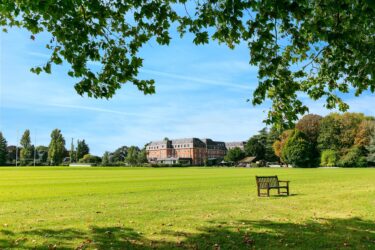
The Latest from The Lensbury
Stay in the know with the latest news covering all corners of our riverside resort.
Read More
Our New Dining Spaces
A brand-new chapter of dining at The Lensbury is taking shape. Ahead of its opening in late summer, learn more about our spaces and the ideas that bring them to life.
Read the blog
Woof & Wag
Back by popular demand, Teddington’s top tail‑wagging event returns this September. Join us for a paw-sitively exciting day celebrating our four-legged friends on the beautiful grounds of The Lensbury!
Book Now
Plan Your Event
From hosting events to holding Team Building days, The Lensbury makes the perfect venue with its 25 acres of riverside grounds and excellent facilities.
Club Membership Benefits
Make the most of our benefits and join The Lensbury Club today with a 12-month membership or a flexible one.
Book Your Tour Enjoy London's Riverside Resort
Book now to experience riverside grounds, a fully-equipped watersports centre, 19 tennis courts, kids' clubs and more. Plus, save on our best rates when you sign up to our email list when booking.
Find Out More Late Availability Offers
Experience the magic of a riverside wedding with our exclusive late availability offers. Find out more today by contacting weddings@lensbury.com or 020 8614 6450
Find Out More Relax and Rejuvenate
Feel pampered and recharged with the help of our qualified & experienced beauty therapists and selection of award-winning ELEMIS products.
Book Treatment The Latest from The Lensbury
Stay in the know with the latest news covering all corners of our riverside resort.
Read More Our New Dining Spaces
A brand-new chapter of dining at The Lensbury is taking shape. Ahead of its opening in late summer, learn more about our spaces and the ideas that bring them to life.
Read the blog Woof & Wag
Back by popular demand, Teddington’s top tail‑wagging event returns this September. Join us for a paw-sitively exciting day celebrating our four-legged friends on the beautiful grounds of The Lensbury!
Book Now Plan Your Event
From hosting events to holding Team Building days, The Lensbury makes the perfect venue with its 25 acres of riverside grounds and excellent facilities.
Club Membership Benefits
Make the most of our benefits and join The Lensbury Club today with a 12-month membership or a flexible one.
Book Your Tour Enjoy London's Riverside Resort
Book now to experience riverside grounds, a fully-equipped watersports centre, 19 tennis courts, kids' clubs and more. Plus, save on our best rates when you sign up to our email list when booking.
Find Out More Late Availability Offers
Experience the magic of a riverside wedding with our exclusive late availability offers. Find out more today by contacting weddings@lensbury.com or 020 8614 6450
Find Out More Relax and Rejuvenate
Feel pampered and recharged with the help of our qualified & experienced beauty therapists and selection of award-winning ELEMIS products.
Book Treatment The Latest from The Lensbury
Stay in the know with the latest news covering all corners of our riverside resort.
Read More Our New Dining Spaces
A brand-new chapter of dining at The Lensbury is taking shape. Ahead of its opening in late summer, learn more about our spaces and the ideas that bring them to life.
Read the blog Woof & Wag
Back by popular demand, Teddington’s top tail‑wagging event returns this September. Join us for a paw-sitively exciting day celebrating our four-legged friends on the beautiful grounds of The Lensbury!
Book Now Plan Your Event
From hosting events to holding Team Building days, The Lensbury makes the perfect venue with its 25 acres of riverside grounds and excellent facilities.
Club Membership Benefits
Make the most of our benefits and join The Lensbury Club today with a 12-month membership or a flexible one.
Book Your Tour Enjoy London's Riverside Resort
Book now to experience riverside grounds, a fully-equipped watersports centre, 19 tennis courts, kids' clubs and more. Plus, save on our best rates when you sign up to our email list when booking.
Find Out More Late Availability Offers
Experience the magic of a riverside wedding with our exclusive late availability offers. Find out more today by contacting weddings@lensbury.com or 020 8614 6450
Find Out More Relax and Rejuvenate
Feel pampered and recharged with the help of our qualified & experienced beauty therapists and selection of award-winning ELEMIS products.
Book Treatment The Latest from The Lensbury
Stay in the know with the latest news covering all corners of our riverside resort.
Read More Our New Dining Spaces
A brand-new chapter of dining at The Lensbury is taking shape. Ahead of its opening in late summer, learn more about our spaces and the ideas that bring them to life.
Read the blog Woof & Wag
Back by popular demand, Teddington’s top tail‑wagging event returns this September. Join us for a paw-sitively exciting day celebrating our four-legged friends on the beautiful grounds of The Lensbury!
Book Now Plan Your Event
From hosting events to holding Team Building days, The Lensbury makes the perfect venue with its 25 acres of riverside grounds and excellent facilities.
Club Membership Benefits
Make the most of our benefits and join The Lensbury Club today with a 12-month membership or a flexible one.
Book Your Tour Enjoy London's Riverside Resort
Book now to experience riverside grounds, a fully-equipped watersports centre, 19 tennis courts, kids' clubs and more. Plus, save on our best rates when you sign up to our email list when booking.
Find Out More Late Availability Offers
Experience the magic of a riverside wedding with our exclusive late availability offers. Find out more today by contacting weddings@lensbury.com or 020 8614 6450
Find Out More Relax and Rejuvenate
Feel pampered and recharged with the help of our qualified & experienced beauty therapists and selection of award-winning ELEMIS products.
Book Treatment The Latest from The Lensbury
Stay in the know with the latest news covering all corners of our riverside resort.
Read More Our New Dining Spaces
A brand-new chapter of dining at The Lensbury is taking shape. Ahead of its opening in late summer, learn more about our spaces and the ideas that bring them to life.
Read the blog Woof & Wag
Back by popular demand, Teddington’s top tail‑wagging event returns this September. Join us for a paw-sitively exciting day celebrating our four-legged friends on the beautiful grounds of The Lensbury!
Book Now Plan Your Event
From hosting events to holding Team Building days, The Lensbury makes the perfect venue with its 25 acres of riverside grounds and excellent facilities.
Club Membership Benefits
Make the most of our benefits and join The Lensbury Club today with a 12-month membership or a flexible one.
Book Your Tour Enjoy London's Riverside Resort
Book now to experience riverside grounds, a fully-equipped watersports centre, 19 tennis courts, kids' clubs and more. Plus, save on our best rates when you sign up to our email list when booking.
Find Out More Late Availability Offers
Experience the magic of a riverside wedding with our exclusive late availability offers. Find out more today by contacting weddings@lensbury.com or 020 8614 6450
Find Out More Relax and Rejuvenate
Feel pampered and recharged with the help of our qualified & experienced beauty therapists and selection of award-winning ELEMIS products.
Book Treatment The Latest from The Lensbury
Stay in the know with the latest news covering all corners of our riverside resort.
Read More Our New Dining Spaces
A brand-new chapter of dining at The Lensbury is taking shape. Ahead of its opening in late summer, learn more about our spaces and the ideas that bring them to life.
Read the blog Woof & Wag
Back by popular demand, Teddington’s top tail‑wagging event returns this September. Join us for a paw-sitively exciting day celebrating our four-legged friends on the beautiful grounds of The Lensbury!
Book Now Plan Your Event
From hosting events to holding Team Building days, The Lensbury makes the perfect venue with its 25 acres of riverside grounds and excellent facilities.
Club Membership Benefits
Make the most of our benefits and join The Lensbury Club today with a 12-month membership or a flexible one.
Book Your Tour Enjoy London's Riverside Resort
Book now to experience riverside grounds, a fully-equipped watersports centre, 19 tennis courts, kids' clubs and more. Plus, save on our best rates when you sign up to our email list when booking.
Find Out More Late Availability Offers
Experience the magic of a riverside wedding with our exclusive late availability offers. Find out more today by contacting weddings@lensbury.com or 020 8614 6450
Find Out More Relax and Rejuvenate
Feel pampered and recharged with the help of our qualified & experienced beauty therapists and selection of award-winning ELEMIS products.
Book Treatment The Latest from The Lensbury
Stay in the know with the latest news covering all corners of our riverside resort.
Read More Our New Dining Spaces
A brand-new chapter of dining at The Lensbury is taking shape. Ahead of its opening in late summer, learn more about our spaces and the ideas that bring them to life.
Read the blog Woof & Wag
Back by popular demand, Teddington’s top tail‑wagging event returns this September. Join us for a paw-sitively exciting day celebrating our four-legged friends on the beautiful grounds of The Lensbury!
Book Now Plan Your Event
From hosting events to holding Team Building days, The Lensbury makes the perfect venue with its 25 acres of riverside grounds and excellent facilities.
Club Membership Benefits
Make the most of our benefits and join The Lensbury Club today with a 12-month membership or a flexible one.
Book Your Tour Enjoy London's Riverside Resort
Book now to experience riverside grounds, a fully-equipped watersports centre, 19 tennis courts, kids' clubs and more. Plus, save on our best rates when you sign up to our email list when booking.
Find Out More Late Availability Offers
Experience the magic of a riverside wedding with our exclusive late availability offers. Find out more today by contacting weddings@lensbury.com or 020 8614 6450
Find Out More Relax and Rejuvenate
Feel pampered and recharged with the help of our qualified & experienced beauty therapists and selection of award-winning ELEMIS products.
Book Treatment The Latest from The Lensbury
Stay in the know with the latest news covering all corners of our riverside resort.
Read More Our New Dining Spaces
A brand-new chapter of dining at The Lensbury is taking shape. Ahead of its opening in late summer, learn more about our spaces and the ideas that bring them to life.
Read the blog Woof & Wag
Back by popular demand, Teddington’s top tail‑wagging event returns this September. Join us for a paw-sitively exciting day celebrating our four-legged friends on the beautiful grounds of The Lensbury!
Book Now Plan Your Event
From hosting events to holding Team Building days, The Lensbury makes the perfect venue with its 25 acres of riverside grounds and excellent facilities.
Club Membership Benefits
Make the most of our benefits and join The Lensbury Club today with a 12-month membership or a flexible one.
Book Your Tour Enjoy London's Riverside Resort
Book now to experience riverside grounds, a fully-equipped watersports centre, 19 tennis courts, kids' clubs and more. Plus, save on our best rates when you sign up to our email list when booking.
Find Out More Late Availability Offers
Experience the magic of a riverside wedding with our exclusive late availability offers. Find out more today by contacting weddings@lensbury.com or 020 8614 6450
Find Out More Relax and Rejuvenate
Feel pampered and recharged with the help of our qualified & experienced beauty therapists and selection of award-winning ELEMIS products.
Book Treatment The Latest from The Lensbury
Stay in the know with the latest news covering all corners of our riverside resort.
Read More Our New Dining Spaces
A brand-new chapter of dining at The Lensbury is taking shape. Ahead of its opening in late summer, learn more about our spaces and the ideas that bring them to life.
Read the blog Woof & Wag
Back by popular demand, Teddington’s top tail‑wagging event returns this September. Join us for a paw-sitively exciting day celebrating our four-legged friends on the beautiful grounds of The Lensbury!
Book Now Plan Your Event
From hosting events to holding Team Building days, The Lensbury makes the perfect venue with its 25 acres of riverside grounds and excellent facilities.
Club Membership Benefits
Make the most of our benefits and join The Lensbury Club today with a 12-month membership or a flexible one.
Book Your Tour Enjoy London's Riverside Resort
Book now to experience riverside grounds, a fully-equipped watersports centre, 19 tennis courts, kids' clubs and more. Plus, save on our best rates when you sign up to our email list when booking.
Find Out More Late Availability Offers
Experience the magic of a riverside wedding with our exclusive late availability offers. Find out more today by contacting weddings@lensbury.com or 020 8614 6450
Find Out More Relax and Rejuvenate
Feel pampered and recharged with the help of our qualified & experienced beauty therapists and selection of award-winning ELEMIS products.
Book Treatment The Latest from The Lensbury
Stay in the know with the latest news covering all corners of our riverside resort.
Read More Our New Dining Spaces
A brand-new chapter of dining at The Lensbury is taking shape. Ahead of its opening in late summer, learn more about our spaces and the ideas that bring them to life.
Read the blog Woof & Wag
Back by popular demand, Teddington’s top tail‑wagging event returns this September. Join us for a paw-sitively exciting day celebrating our four-legged friends on the beautiful grounds of The Lensbury!
Book Now Plan Your Event
From hosting events to holding Team Building days, The Lensbury makes the perfect venue with its 25 acres of riverside grounds and excellent facilities.